Home Assistant
💡 Quick Navigation
Home Assistant is the control and automation hub for my smart home. It does more than collect devices from different brands on one dashboard. It combines presence, time, and device state into routines that remain understandable and maintainable over time.
I run Home Assistant in Docker on OMV. OMV provides compute and container management, while a persistent mount preserves the configuration. This follows the same principle as the rest of my Home Lab: TrueNAS manages data; OMV runs services.
🎯 Why I Use It
I do not want a separate app for every brand
My lights, HVAC system, air purifier, cameras, TVs, and sensors come from different vendors. When everything stays inside its vendor app, each device works in isolation and cross-brand automation becomes difficult.
Home Assistant turns them into a consistent set of entities that I can control, monitor, and automate in the same way.
Automations should follow real-life context, not just schedules
Turning on a light at a fixed time is easy. A useful automation also considers:
- Whether anyone is home
- Whether it is daytime or nighttime
- Whether the TV, HVAC system, or air purifier is already running
- Whether the air quality is good enough to turn off the purifier
- Whether manual control remains available if the automation fails
Prefer local control
Whenever a device supports LAN, Bluetooth, MQTT, or another local API, I prefer the local integration. Core controls and most automations can continue to work even when the internet or a vendor cloud is temporarily unavailable.
🧱 My Architecture
flowchart TD
    U[Phone / Tablet / Browser] --> RP[Reverse Proxy / HTTPS]
    RP --> HA[Home Assistant<br/>OMV / Docker]
    SSO[OpenID SSO] --> HA

    LAN[LAN Discovery / Bluetooth / MQTT] --> HA
    HA --> IOT[Lights / HVAC / Air Purifier / Sensors]
    HA --> CAM[Cameras / Frigate]
    HA --> MEDIA[TV / Cast / Plex]
    HA --> INFRA[OpenWrt / OMV]
    HA --> DATA[(Config / Backup)]
Deployment summary
| Item | Current Setup | Reason |
|---|---|---|
| Runtime host | OMV | Central Docker compute node for Home Lab services |
| Deployment | Docker Compose | Consistent configuration, upgrades, and rollbacks |
| Version strategy | Pinned image tag | Prevents an unexpected version jump during a rebuild |
| Version at review | Home Assistant Core 2026.8.2 | This article documents the system at that version |
| Network | network_mode: host | Simplifies mDNS, device discovery, and LAN integrations |
| Configuration | Host path mounted at /config | Preserves settings and history across container rebuilds |
| Bluetooth | Host D-Bus mount | Lets Home Assistant use the host Bluetooth stack |
| External access | Reverse proxy + HTTPS + OpenID SSO | Provides one controlled entry point without exposing the raw service port |
| Backup | Weekly full backup + pre-upgrade backup | Covers routine failures and upgrade risk |
Docker Compose summary
This is the core configuration with private paths and environment details removed:
services:
  homeassistant:
    container_name: homeassistant
    image: homeassistant/home-assistant:2026.8.2
    environment:
      - TZ=<your-timezone>
    volumes:
      - <config-path>:/config
      - ./patches/luci/device_tracker.py:/usr/src/homeassistant/homeassistant/components/luci/device_tracker.py:ro
      - /etc/localtime:/etc/localtime:ro
      - /run/dbus:/run/dbus:ro
    restart: unless-stopped
    privileged: true
    cap_add:
      - NET_ADMIN
    network_mode: host
Warning
Host networking,
privileged: true, andNET_ADMINare part of my current setup for LAN discovery, Bluetooth, and existing integrations. They are not universal requirements. Each permission increases the container’s access and should be reviewed and reduced where possible.
🔌 Devices and Integrations
The goal is not to maximize the integration count. I want the devices that affect daily life to share one consistent state model.
| Category | Current Integrations and Devices |
|---|---|
| Lights and switches | TP-Link / Tapo, Tuya / LocalTuya, Xiaomi, Govee, SwitchBot, ESPHome |
| HVAC and environment | Resideo / Honeywell Home T6 Pro, Blueair, Qingping, weather and air-quality data |
| Media | Android TV, Apple TV, Google Cast, Plex |
| Cameras | Tapo, Frigate, go2rtc |
| Presence | Home Assistant Companion App, Bluetooth / iBeacon, OpenWrt LuCI |
| Home Lab | OpenMediaVault, MQTT, network-device status |
| UI | HACS, Mushroom, UI Lovelace Minimalist |
The dashboard is divided into Home, Lights, Devices, and Network views. The home page contains only the states I check every day; detailed controls and diagnostics live on separate views instead of putting every entity on one dashboard.
I also use template sensors to summarize how many lights, switches, and relevant sensors are currently active. This is more useful as a household overview than checking every device individually.
❄️ HVAC and Climate Control
Cooling and heating are controlled by a Resideo (Honeywell Home) T6 Pro thermostat. Home Assistant connects to it locally through the built-in HomeKit Controller, so reading the state and sending commands do not depend on the vendor cloud.
Home Assistant -> HomeKit Controller -> T6 Pro Thermostat -> HVACThe dashboard thermostat card shows the current temperature, adjusts the target temperature, and switches between cool, heat, and off. The same climate entity is used by automations, so manual control and energy-saving rules share one source of truth.
Current HVAC automations
| Automation | Condition | Action |
|---|---|---|
Cooling Midnight Off | It is 1:00 a.m. and the HVAC is still in cool mode | Set the HVAC mode to off |
Away HVAC Off | The primary presence entity has been away for 10 minutes and HVAC is in cool or heat mode | Set the HVAC mode to off |
The midnight shutdown is a safety net against cooling all night. The away delay filters brief phone disconnects so a momentary network drop does not immediately turn off the system.
Note
Away HVAC Offcurrently triggers from one primary presence entity. In a multi-person household, the more complete design is to wait until everyone is away so the HVAC is not turned off while someone is still home.
⚡ Automations I Actually Use
| Scenario | Trigger / Condition | Action |
|---|---|---|
| Away camera mode | Everyone has been away for a period of time | Disable privacy mode and enable the required monitoring features |
| Home camera mode | A household member returns home | Restore camera privacy mode |
| Midnight HVAC shutdown | It is 1:00 a.m. and the system is still cooling | Turn off HVAC |
| Away HVAC shutdown | Primary presence is away for 10 minutes while cooling or heating is active | Turn off HVAC |
| TV ambient lighting | The TV turns on or off, with sunrise/sunset as context | Turn on the appropriate TV-wall lights, then turn them off with the TV |
| Air purifier | Scheduled time or presence change, with air quality checked first | Turn the purifier on or off without shutting it down too early during poor air quality |
| NFC shortcuts | A registered NFC tag is scanned | Run frequent actions such as turning off lights |
| Weekly backup | Early Saturday morning | Create a compressed full backup and retain it for 14 days |
My automation principles
- Check state before acting: do not send another off command when a device is already off.
- Delay away transitions: a short phone disconnect should not trigger the complete away routine.
- Evaluate the whole household: one person leaving does not mean the home is empty.
- Preserve manual control: the physical switch or original app should still work if an automation fails.
- Protect high-risk actions separately: lock controls should not depend only on a clonable tag; phone unlock state, notifications, and physical security also matter.
📍 Presence Detection: The Problem Worth Documenting
Presence is the shared foundation for camera privacy, HVAC energy savings, and away routines. If presence is wrong, every downstream automation can behave incorrectly even when its logic is otherwise perfect.
Problem: OpenWrt reachable is not a stable “person is home” signal
I use the OpenWrt LuCI tracker to determine whether phones are connected to the home network. In practice, the reachable flag in the OpenWrt neighbor table can briefly become false while a phone remains connected to Wi-Fi.
The original LuCI integration also has an edge case: if a registered phone is missing from the first only_reachable=True scan, its tracker entity may never be created, and later coordinator polls cannot bring it back.
My solution
flowchart LR
    R[OpenWrt LuCI] --> RAW[Raw Device Tracker]
    RAW --> PATCH[Local LuCI Patch]
    PATCH --> SMOOTH[Template Tracker<br/>3-8 Minute Debounce]
    SMOOTH --> PERSON[Person Entity]
    PERSON --> AUTO[Household Automations]
I keep only_reachable=True so stale ARP records are not treated as devices that are still home. A version-specific local patch also creates entities for previously registered devices even when they are missing from the first scan. They begin as not_home and can recover during a later 30-second poll.
A template tracker adds another layer above the raw tracker:
- A transition to
homeis applied immediately - A transition to
not_homewaits 3-8 minutes - If the phone reconnects during that delay, the away routine never runs
The conceptual configuration below uses a placeholder instead of the real entity ID:
template:
  - trigger:
      - platform: state
        entity_id: device_tracker.<phone>
        to: "home"
      - platform: state
        entity_id: device_tracker.<phone>
        to: "not_home"
        for: "00:05:00"
    device_tracker:
      - name: phone_smoothed
        in_zones: >-
          {{ ['zone.home'] if states('device_tracker.<phone>') == 'home' else [] }}
Important
This patch replaces the LuCI module inside the Home Assistant image. Before every Home Assistant upgrade, I must compare it with the new upstream file. If upstream fixes the behavior, the patch should be removed instead of becoming a permanent fork.
🖥️ The Role of the Dashboard
The dashboard is a control and observation interface, not the place where automation logic should live.
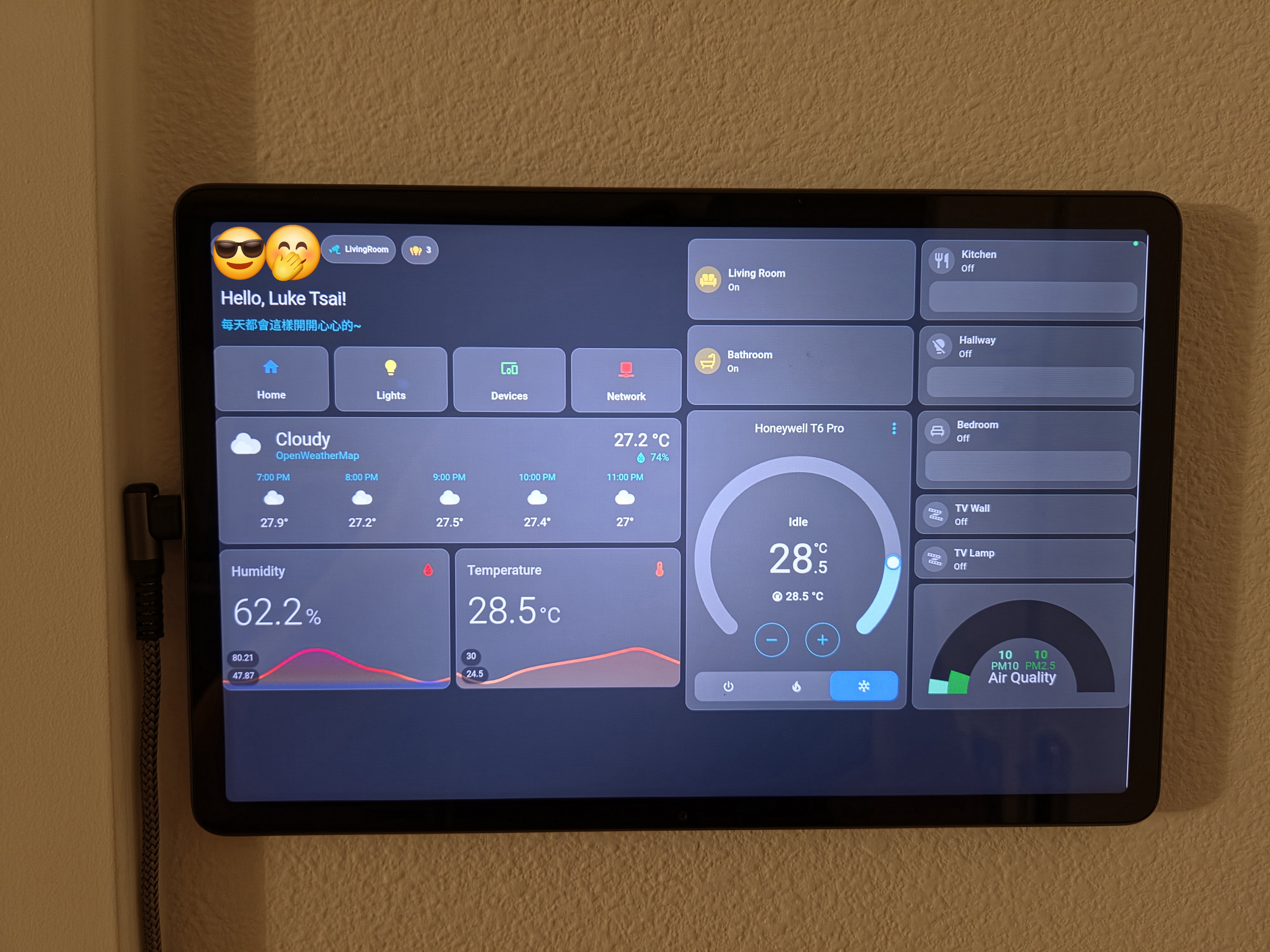
This is the Home Assistant WebUI currently mounted on the wall. The hardware is a cheap Android tablet, mainly used as a fixed household control panel for frequent actions, temperature and humidity, air quality, and HVAC status.
Home: household summary, presence, weather, and frequent controlsLights: lights and groups organized by roomDevices: HVAC, air purifier, robot vacuum, and media devicesNetwork: Home Lab and network-device status
I use HACS for selected frontend components, along with Mushroom and UI Lovelace Minimalist. The UI can evolve slowly, but entity naming, area assignment, and automation logic should become stable first. A beautiful dashboard does not make a disorganized entity model maintainable.
💾 Backup and Recovery
An Auto Backup automation creates a compressed full backup early every Saturday and retains it for 14 days. I create another manual backup before each upgrade.
What I protect
configuration.yamland split YAML configuration files- Integration, entity registry, and dashboard state in
.storage automations.yaml,scripts.yaml, andscenes.yamlcustom_components, themes, and frontend resources- Secrets and certificates, without placing them in public documentation or a public repository
- The Recorder database, which contains history but must not be the only copy of the configuration
Recovery order
- Stop the Home Assistant container.
- Preserve a copy of the failed configuration so the only diagnostic evidence is not overwritten.
- Restore the last known-good configuration and backup.
- Start with the same pinned image tag instead of upgrading during recovery.
- Verify login, core integrations, presence, camera privacy mode, and HVAC controls.
- Handle version upgrades or historical data only after the core system is stable.
I have previously retained a corrupted SQLite Recorder database file. It was a useful reminder that backing up configuration, backing up history, and practicing a restore are three different things.
⬆️ Upgrade Process
Home Assistant moves quickly, and my installation includes HACS integrations and a local LuCI patch. I therefore do not follow latest automatically.
Before an upgrade
- Read the release notes, especially deprecated integrations and YAML breaking changes.
- Create a full backup and record the current image tag for rollback.
- Confirm that HACS custom integrations support the target release.
- Compare the new LuCI
device_tracker.pywith the local patch. - Run
docker compose config --quietto catch Compose structure or environment-variable problems. - Run Home Assistant’s configuration check.
After an upgrade
- Confirm that the container starts successfully and inspect error logs.
- Reload LuCI and confirm that raw and smoothed trackers recover correctly.
- Test home/away flows, camera privacy, HVAC, lights, and TTS.
- Check dashboards and HACS cards for frontend errors.
- Confirm that the next scheduled backup can be created.
If a core function fails, I roll back the image tag and configuration instead of stacking multiple experiments on a broken production instance.
🔐 Security and Privacy
- External access goes through an HTTPS reverse proxy instead of exposing the raw Home Assistant port.
- OpenID SSO is a convenient login layer, not a replacement for Home Assistant permissions, strong passwords, and MFA.
- API keys, client secrets, exact locations, LAN IPs, device IDs, and tag IDs do not belong in public notes.
- YAML credentials should use
!secret, and secrets or.envfiles must stay out of public Git repositories. privileged,NET_ADMIN, and host networking should be reviewed regularly to confirm they are still required.- Camera automations default to household privacy, with a manual way to restore privacy mode if anything behaves unexpectedly.
🧯 Problems I Have Run Into
1. Treating presence as absolute truth
Wi-Fi trackers, Bluetooth, and phone apps can all disconnect briefly. Reliable presence needs debounce, multi-person conditions, and a safe default when signals fail.
2. Building complex automations too early
If the first automation contains a dozen conditions, one renamed entity can affect everything. Starting with two or three low-risk routines used every day is more reliable than attempting whole-home automation at once.
3. Custom integrations and patches have a maintenance cost
HACS is convenient, but every custom component adds another dependency that can break after an upgrade. A local patch needs an explicit tested version and clear removal criteria.
4. Creating backups without testing recovery
The existence of a backup file does not prove it can be restored. I need to know how to start the pinned version, restore the configuration, and verify the most important automations.
5. Dashboard organization cannot replace entity organization
Dashboard cards can always be rebuilt. Inconsistent names, areas, and device relationships increase the maintenance cost of every automation.
If You Want to Build Something Similar
- Define naming rules for areas, devices, and entities first.
- Begin with two or three low-risk routines that you will use every day.
- Add a delay to away detection and preserve manual controls.
- Establish backup and recovery procedures before adding custom integrations.
- Let the system run reliably before adding cross-brand and multi-person presence automations.
The value of Home Assistant is not the number of buttons on the dashboard. It is having the right devices do the right thing at the right time while keeping the system understandable, maintainable, and recoverable when something goes wrong.
Back to Home Lab Overview